

FAQs
Affiliate Program
Joining the Biopure Health® Affiliate Program is simple. Here's how to get started:
- Submit your application. Complete the Affiliate Practitioner application. Applications are reviewed and approved at the sole discretion of Biopure Health®.
- Review and sign the Affiliate Agreement. Once approved, you will receive an Affiliate Agreement to review and sign electronically. Please read it carefully, as it outlines your rights, responsibilities, and commission structure.
- Get your unique tracking link and code. After your agreement is accepted, you will receive a unique Affiliate Link and Affiliate Code to share with your patients and followers.
- Start promoting. Share your Affiliate Link and code through your website, email newsletters, and social media channels, and start earning commissions on qualifying purchases.
Questions? Contact us at [email protected].
The Biopure Health® Affiliate Program is designed for members of our Healthcare Professionals group and wellness advocates who are passionate about sharing high-quality, science-backed supplements with their audience.
Who can apply?
Whether you're a licensed healthcare professional or a content creator with an engaged audience, you may be eligible to join. We welcome HCPs, influencers, wellness advocates, and anyone with a strong social media following or email list who shares a passion for health and aligns with our brand values. All applications are reviewed on a case-by-case basis.
How do I apply?
If you meet the criteria above, submit your Affiliate Program application. Our team will review it and follow up with the next steps.
For questions about eligibility, contact us at [email protected].
Your unique Affiliate Link and Affiliate Code are both in your Affiliate Dashboard.
How do I find them?
- Log in to your Affiliate Dashboard and go to the Info Page section
- Copy your unique Affiliate Link to share directly with your audience. This link tracks all purchases made when a customer clicks through to biopurehealth.com.
- Copy your Affiliate Code to share with patients and followers so they can enter it at checkout for a 10% discount
There are three ways a customer's purchase can be credited to you as an affiliate.
1. Affiliate link (no discount)
- The customer receives no discount
- The affiliate earns 40% of the sale
- No indication of the affiliate is shown at checkout
- The sale is tracked automatically via Affiliatly
2. Coupon code (manual entry)
- The customer manually enters the coupon code at checkout
- The customer receives 10% off
- The affiliate earns 20% of the sale
- No affiliate information is displayed at checkout, but the sale is tracked via Affiliatly
3. Auto-applied coupon code
- The coupon code is automatically populated when the customer clicks the link
- The customer receives 10% off
- The affiliate earns 20% of the sale
- The affiliate code is displayed at checkout, and the sale is tracked via Affiliatly
Which should I use?
- Use your link when sharing online, where customers can click directly—social media posts, emails, blog posts, or stories
- Use your code when a clickable link isn't possible—podcasts, videos, in-person events, or printed materials
For payout details, see How do I earn commissions?
Yes — if you are a U.S.-based Affiliate Practitioner and earn $600 or more in a calendar year, you will be required to submit a completed IRS Form W-9 before your commission payment can be issued at or above that threshold.
You can download a W-9 form directly from the IRS website at irs.gov. Once completed, please submit it to us at [email protected].
If you are an international Affiliate Practitioner, additional tax documentation may be required upon request.
For questions, contact us at [email protected]
Once you're approved and your account is active, you can track all of your affiliate activity—including clicks, orders, and commissions earned—in your Affiliate Dashboard.
How do I access my dashboard?
Log in anytime at My Affiliate Dashboard. Our affiliate program runs on Affiliatly.
What can I see in my dashboard?
- Total clicks on your Affiliate Link
- Number of qualifying orders
- Commissions earned and pending
- Payment history
- Account and payment settings
When are commissions paid?
Commissions are calculated quarterly and paid within 30 days of the end of each quarter. A minimum balance of $50.00 must be reached before a payment is issued.
Do I need to fill out a W-9?
U.S.-based affiliates may need to submit a W-9 before receiving payment. See Do I need to fill out a W-9? for details.
For questions about your earnings or dashboard access, contact us at [email protected].
You earn a commission when a retail customer makes a purchase through your affiliate link or with your affiliate code.
How much can I earn?
- Affiliate link (no discount for the customer): you earn 40% of the sale
- Affiliate code (customer enters it at checkout): the customer receives 10% off and you earn 30% of the sale
- Auto-applied code (populated when the customer clicks your link): the customer receives 10% off and you earn 30% of the sale
See What's the difference between my links and code? For how each option works.
How and when am I paid?
- All commissions are tracked through Affiliatly
- Affiliates are paid quarterly
- A minimum balance of $50 must be reached before a payout is issued
Where can I see my earnings?
Log in to your Biopure Health® Affiliate Dashboard to see your commissions and payout history.
How Do I Use the Affiliate Link Generator?
The Biopure Health® Affiliate Link Generator allows you to create personalized referral links to individual products or pages on our website.
Each generated link includes your unique affiliate tracking information, allowing you to earn commissions on qualifying customer purchases.
Step 1: Log In to Your Affiliate Dashboard
Visit the Biopure Health Affiliate Dashboard.
Log in using your registered email address and password.
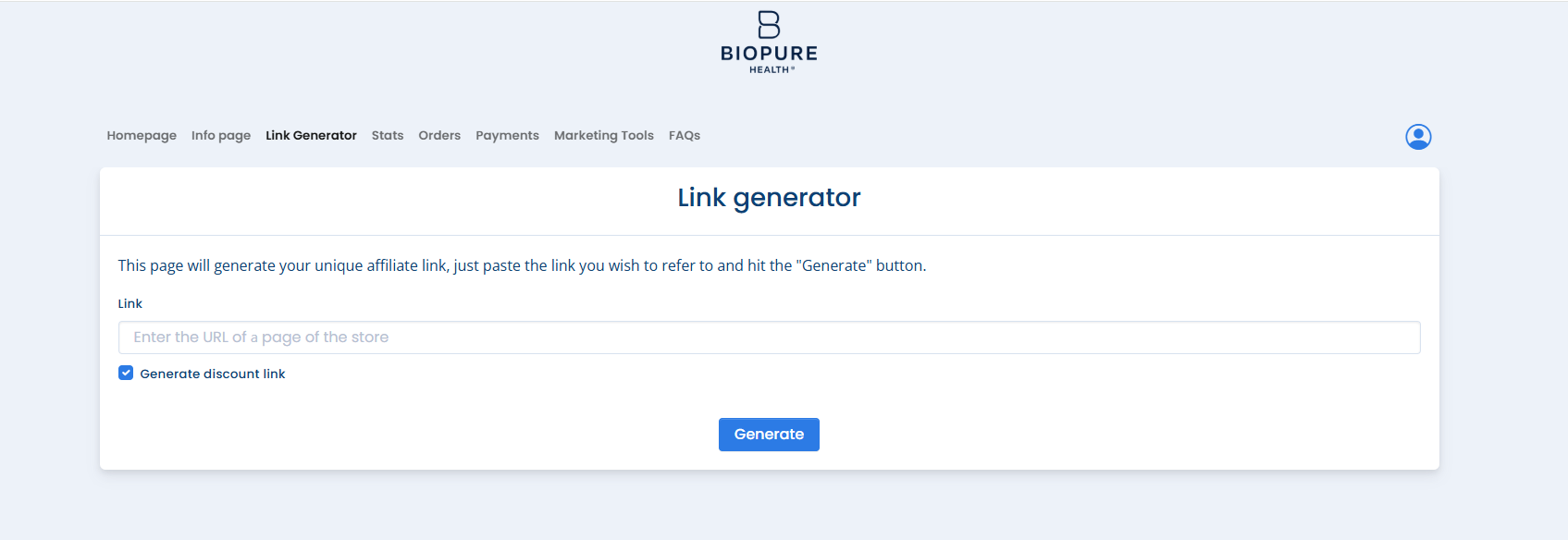
Select Link Generator from your dashboard menu
Step 2: Copy the Product URL
Visit biopurehealth.com.
Find the product or page you want to share.
Copy the complete URL from your browser's address bar.
Tip: You can generate links to individual products, collections, or other pages on the Biopure Health website.
Step 3: Generate Your Affiliate Link
Return to the Link Generator in your Affiliate Dashboard.
Paste the URL into the link generator field.
Select any additional options you'd like to use:
Generate shortened URL: Creates a shorter link that's easier to share.
Generate discount link: Automatically applies your assigned affiliate coupon at checkout.
Click Generate.
Your personalized affiliate link is now ready to use!
Step 4: Copy and Share Your Link
The Link Generator provides two sharing formats:
Affiliated Link: Copy this link for emails, social media, text messages, and direct customer recommendations.
HTML Code: Use this option to embed your affiliate link on a website or blog.
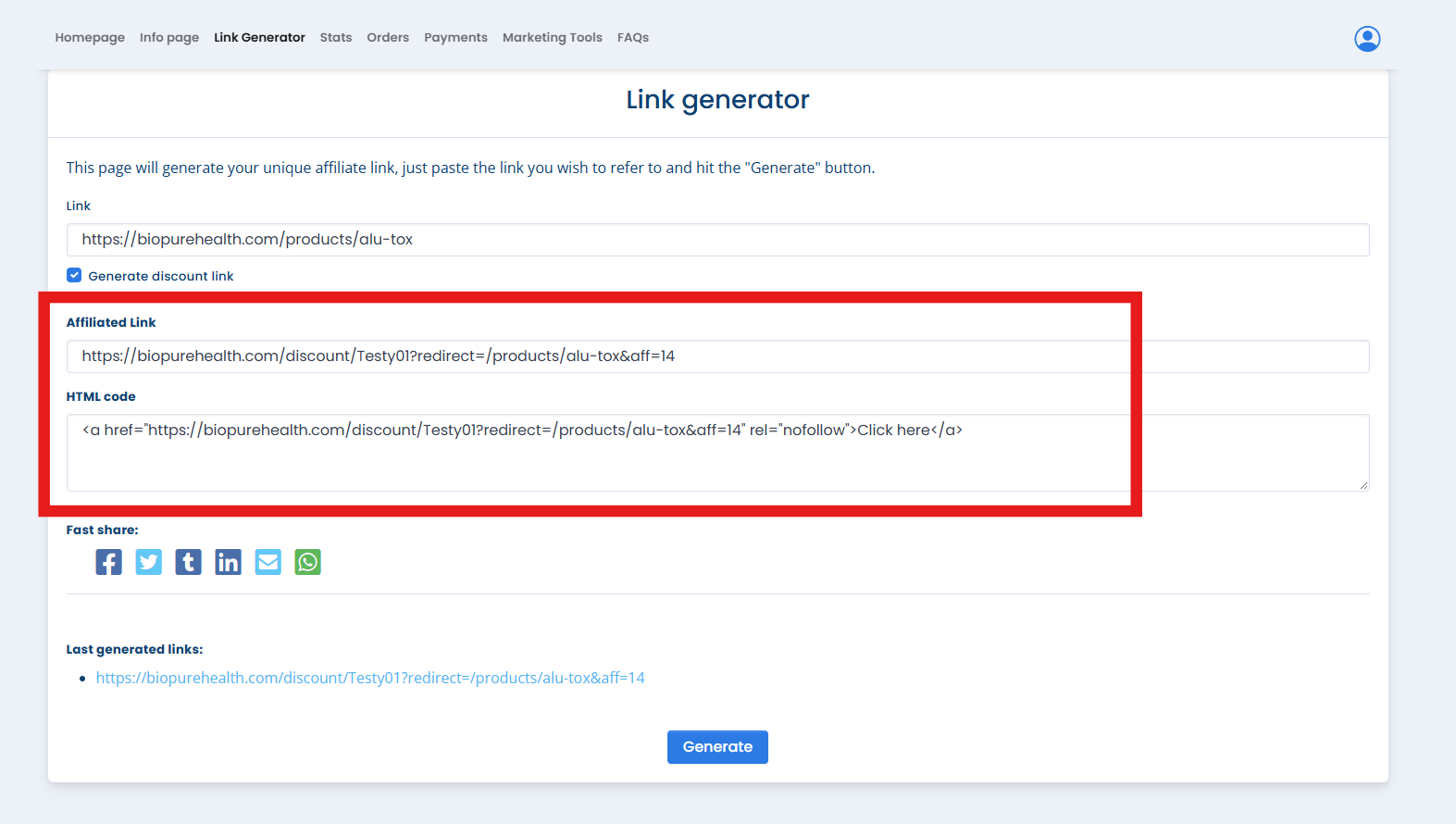
Important: Be sure to share your generated affiliate link rather than the original product URL so your referrals can be tracked.
Understanding Your Link Options
Standard Affiliate Link
Sends customers directly to your selected product or page.
Tracks qualifying purchases through your affiliate account.
Does not automatically apply a customer discount.
Discount Affiliate Link
Includes your affiliate tracking information.
Automatically applies your assigned affiliate coupon at checkout.
Provides eligible retail customers with their associated affiliate discount, currently 10%.
Frequently Asked Questions
Can I create links for individual products?
Yes! Simply copy the product's URL and paste it into the Link Generator. You can create a separate affiliate link for any product you'd like to recommend.
Can I use my link on social media?
Absolutely! Affiliate links can be shared through social media, email, text messages, and websites.
Will my customers automatically receive a discount?
Only if you select Generate discount link and have an assigned affiliate coupon. Standard affiliate links do not automatically provide discounts.
How can I check my affiliate activity?
Log in to your Affiliate Dashboard and select Stats or Orders to review referral activity and qualifying purchases.
Need Help?
If you have questions about generating your affiliate links or accessing your account, our Biopure Health® Customer Support Team is happy to help.
We Now Offer Text Message Support!
Yes! At Biopure Health®, we're always looking for ways to make it easier to connect with us. That's why we're excited to introduce SMS text messaging as a new support channel!
Whether you have a question about your order, need help with your subscription, or just want a faster way to reach our team, you can now get support right from your phone via text.
Why text support?
We know life is busy. Sometimes you don't have time to write an email or wait on hold. Text messaging lets you:
- Get support quickly and conveniently
- Communicate on your schedule
- Get quick answers from our AI assistant, with our support team ready to step in when you need more help
- Pick up conversations right where you left off
How do I get started?
Text JOIN to (425) 671-9197. You'll receive a confirmation text letting you know you're opted in and ready to go.
Please note: Our text support line, (425) 671-9197, is separate from our phone line. If you'd like to speak with someone directly, please call us at (425) 462-8414. Calls and texts cannot be received on the same number.
What can I get help with via text?
- Order status and tracking
- Subscription changes or cancellations
- Product questions
- Returns and refunds
- General support inquiries
A few things to know
- Response times: Our team is available during business hours, and we'll always do our best to respond promptly
- This is a support channel, not a marketing channel. We will only text you in response to your inquiries or with relevant support updates
- Your privacy matters. We will never share your number with third parties
- Opting out is easy. Text STOP at any time to unsubscribe, or START if you ever want to rejoin
We're so excited to offer this new way to connect. As always, we're here to support your wellness journey every step of the way.
This article walks you through everything you need to know about using SMS text messaging to connect with our support team.
Step 1: Opt in
To start receiving support via text, you'll need to opt in first. Text JOIN to (425) 671-9197.
You'll receive an automatic confirmation message that looks like this:
"You're in! You've opted in to SMS support from Biopure Health. We're happy to help! Msg & data rates may apply. Msg frequency varies. Reply STOP anytime to unsubscribe or HELP for assistance."
Once you receive that confirmation, you're all set!
Step 2: Send us a message
Simply text your question or request to (425) 671-9197, and we'll respond as quickly as we can.
Please note: Our text line and phone line are separate. Calls cannot be received on the text line, and texts cannot be received on the phone line.
- To text us: (425) 671-9197
- To call us: (425) 462-8414
Tips for faster support:
- Include your order number if your question is order-related
- Let us know your email address so we can pull up your account quickly
- Be as specific as possible so we can help you right away
Step 3: Get support
Our AI assistant or a member of our support team will reply and work with you to resolve your inquiry. If you need more personal help, our team will take it from there.
Frequently asked questions
What are your SMS support hours?
Our team is available Monday–Thursday, 9 AM–5 PM ET, and Friday, 9 AM–1 PM ET. We do our best to respond to all messages within 24 hours.
Is there a cost to text you?
Texting our support line is free on our end, but standard message and data rates from your carrier may apply.
How do I opt out?
Text STOP to (425) 671-9197 at any time. You'll receive a confirmation that you've been unsubscribed and will no longer receive messages from us.
Can I opt back in after opting out?
Absolutely! Just text START to (425) 671-9197 and you'll be re-subscribed right away.
What if I need more help?
If your issue requires more detailed support, our team may follow up via email. You can also reach us at:
- Call us: (425) 462-8414
- Text us: (425) 671-9197
- Email: [email protected]
SMS keywords
| Keyword | What it does |
|---|---|
| JOIN | Opt in to SMS support |
| STOP | Opt out / unsubscribe |
| START | Re-subscribe after opting out |
| HELP | Get assistance or contact info |
We're so glad you're here. Our team looks forward to supporting you!
Login Assistance
Healthcare Professional accounts use a secure one-time verification code instead of a password. Each time you log in, we'll email you a 6-digit code.
How to log in
Go to the Biopure Health® website. Visit biopurehealth.com and choose the Login option.

Enter the email address associated with your Healthcare Professional account.
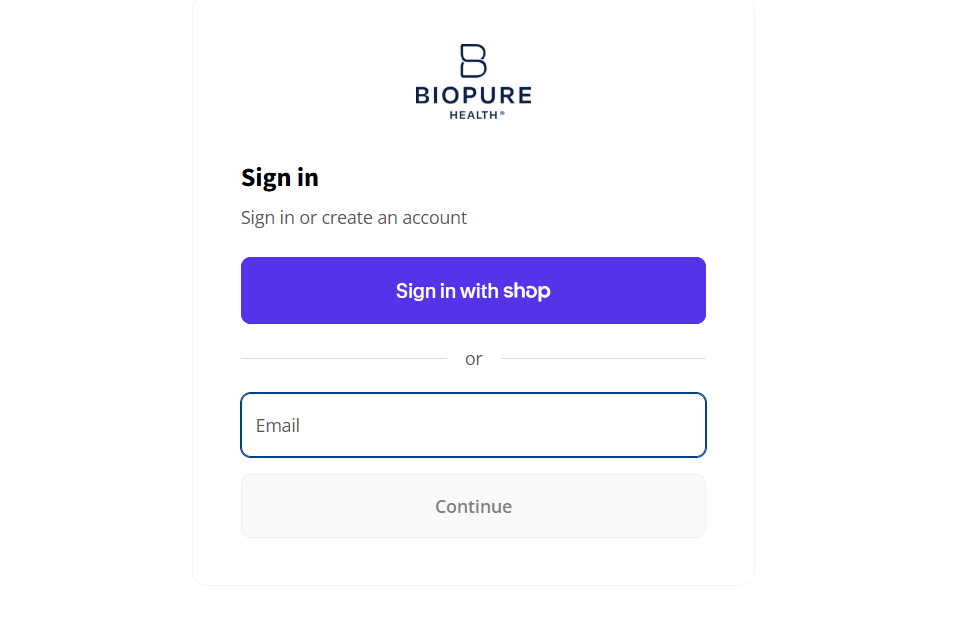
Skip the "Shop" login option unless you have a Shop account. You don't need a Shop account to log in.
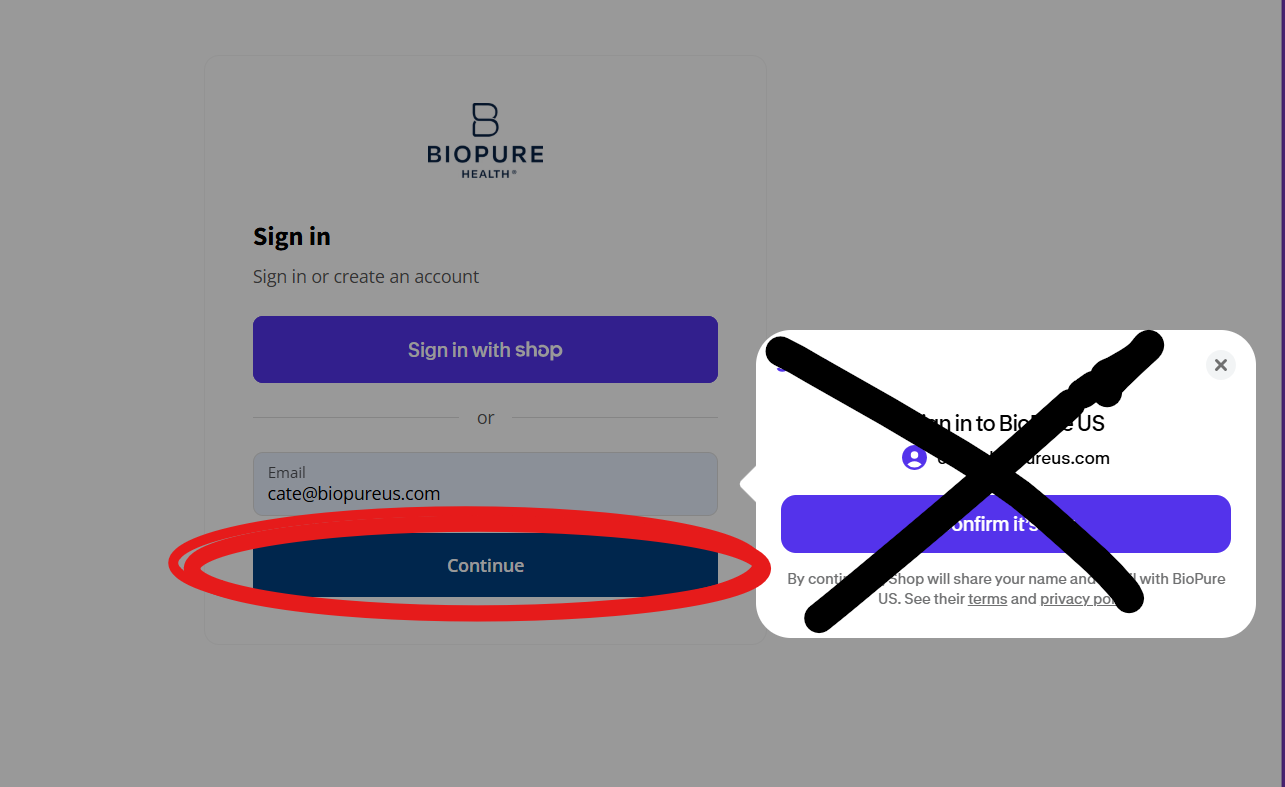
Check your email for a message from [email protected].
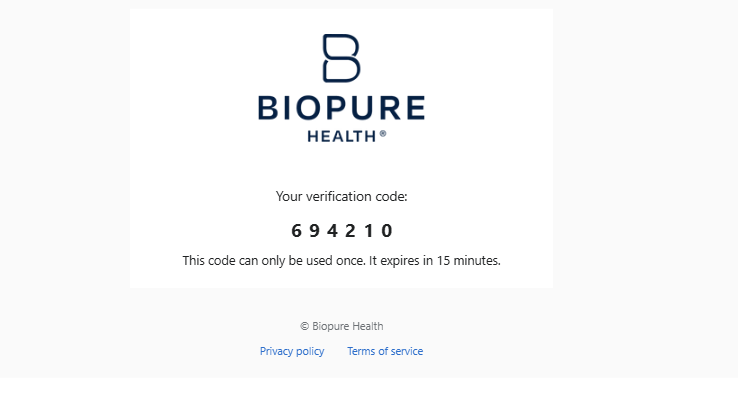
Copy your 6-digit verification code from the email.

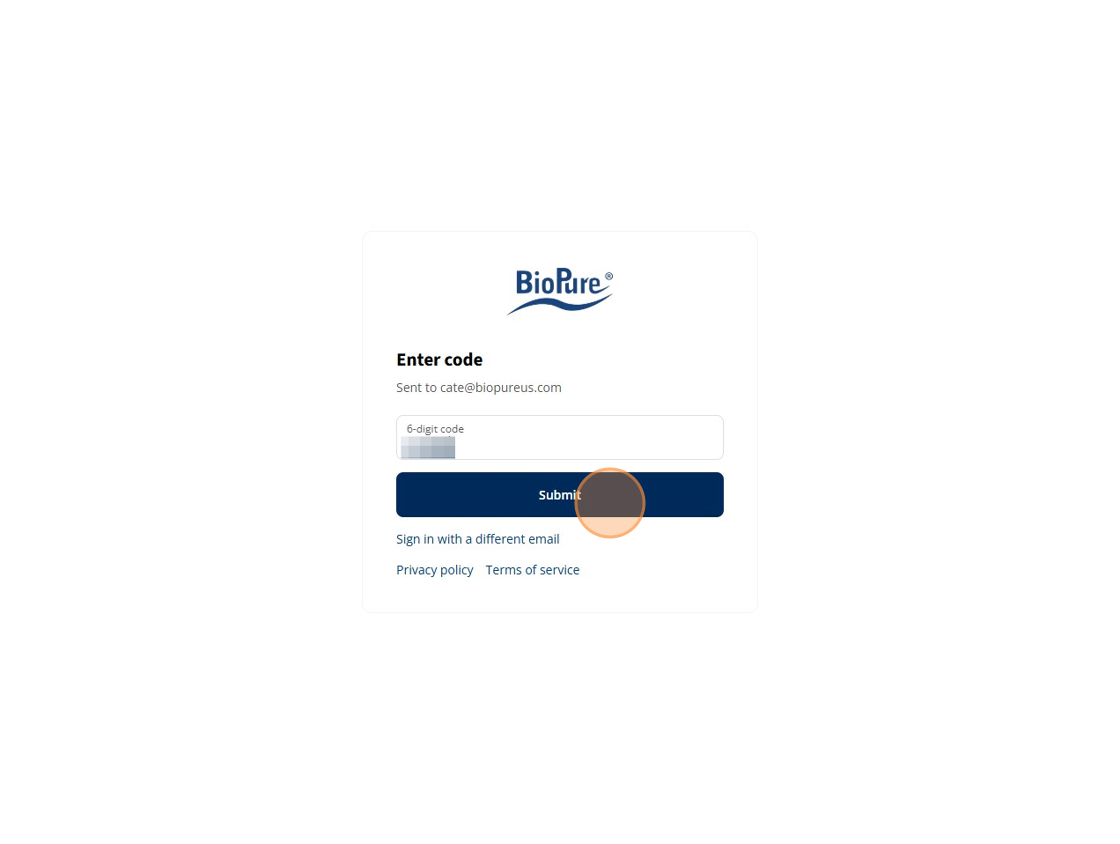
Enter the code and click "Submit."
Select your location. Your location determines where your order will ship. If your preferred shipping address isn't listed, select your business location for now. You can add a new shipping address later.
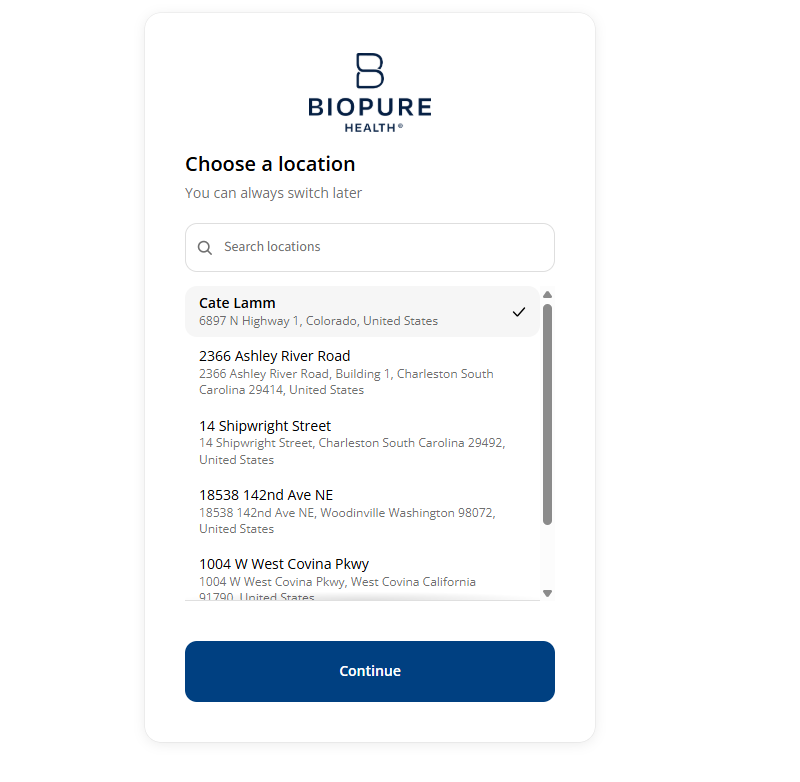
Click "Continue."
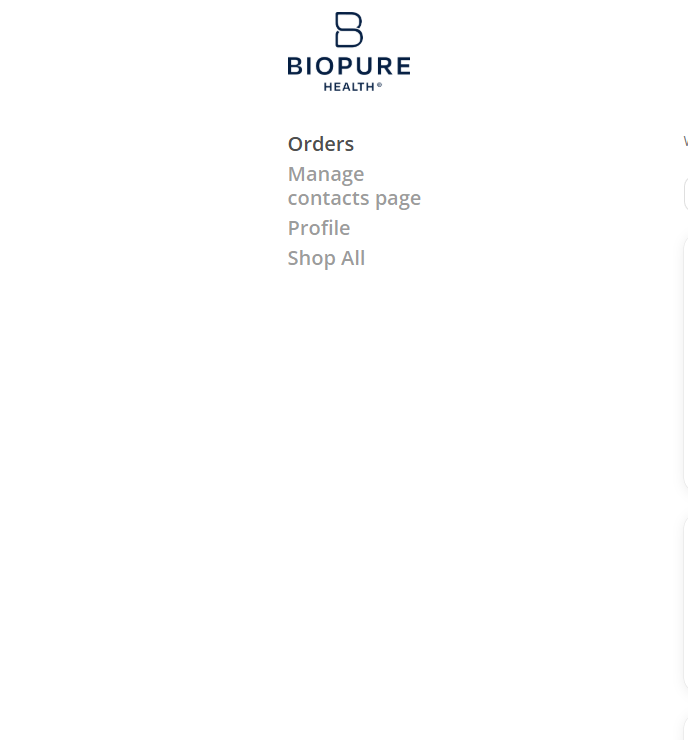
Review your past orders, which appear on the next page.
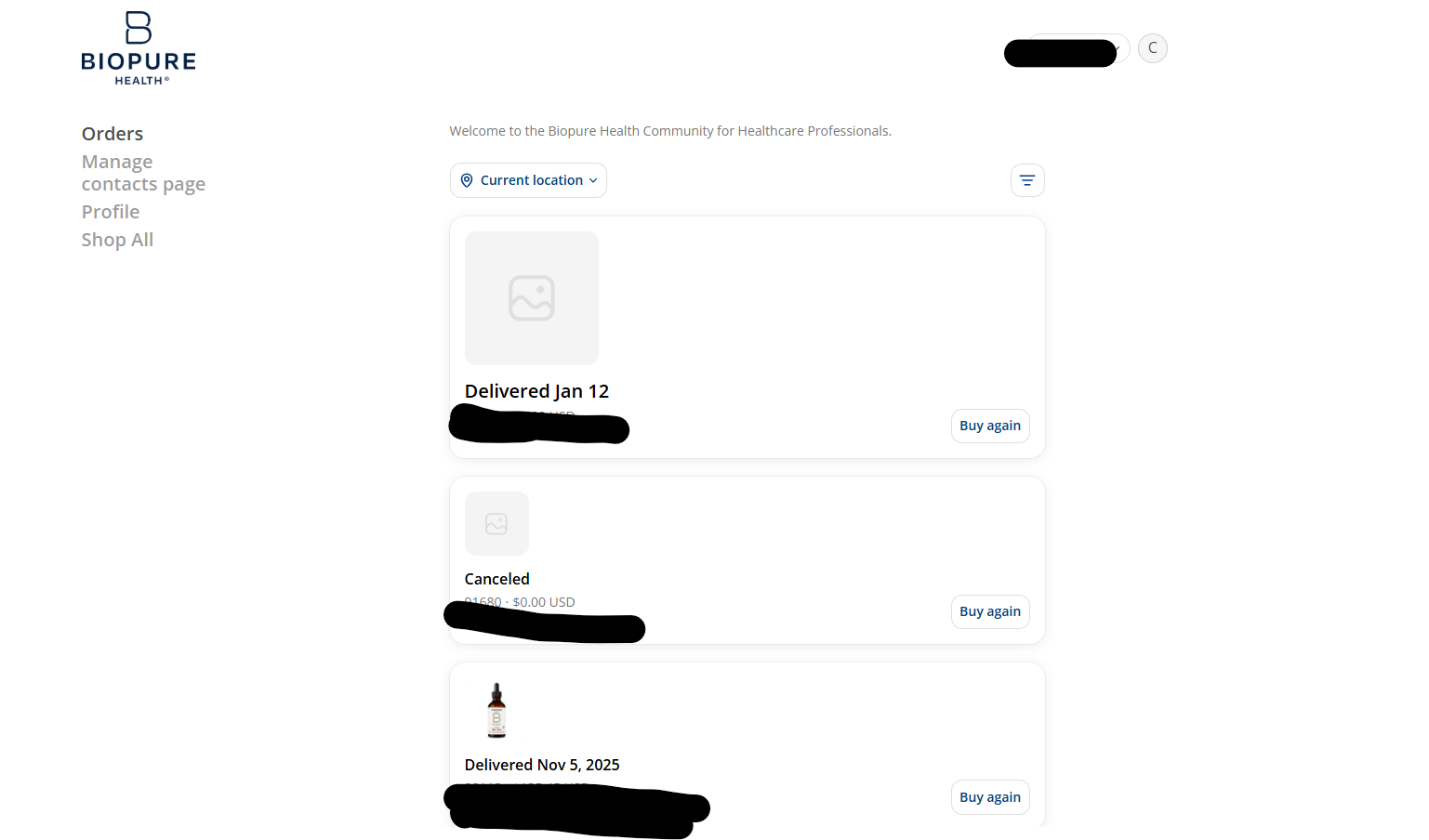
Click "Shop All" to begin your order.
What if I don't receive the code?
If the email doesn't arrive within a few minutes, check your spam or promotions folder, then try again. If you don't have access to the email address on the account, ask the account holder to add you as a user. See How do I add a user to my account?
How do I place an order?
- Click Shop from the main menu
- Browse and add products to your cart
- Go to Checkout. Your selected location appears as the default shipping address.
To ship somewhere else, see How do I add or edit a shipping location? or How do I change an address on the checkout page?
Healthcare Professional Account Information
A Healthcare Professional Account is designed for qualified practitioners who integrate Biopure Health® formulations into their clinical work to support patient care and long-term health creation.
What does the program include?
Through this program, we provide preferred practitioner pricing, access to professional-only educational resources, and personalized customer support tailored to the needs of healthcare providers. Whether you are a functional medicine practitioner, naturopath, chiropractor, nutritionist, or other licensed or certified health professional, this program is designed to support you in confidently recommending Biopure Health® products within your practice.
What is Biopure Health®'s approach?
At Biopure Health®, we take a proactive and systems-based approach to wellness, blending the best of science and nature to create high-quality formulations. Our comprehensive product portfolio is designed to support key areas of health including detoxification, immune function, gut health, and overall resilience.
We are committed to partnering with healthcare professionals who value integrity, quality, and meaningful outcomes. A Healthcare Professional Account provides access to trusted formulations along with the education and support needed to help patients move toward sustainable, long-term well-being.
Our Drop Ship Program makes it easier for practitioners to provide patients with the supplements they need—without the hassle or cost of maintaining in-office inventory. By using our fulfillment services, you can focus on patient care while we handle the logistics.
What are the benefits?
- Encourages protocol adherence: patients can easily continue their health protocols without delays or missed doses
- Eliminates inventory costs: avoid the expense and space needed to stock products in your office
- Protects your revenue channels: keep earning from every order without the overhead of managing inventory
- Strengthens patient relationships: keep patients connected to your practice as their trusted source for wellness solutions
How does it work?
- Collect payment from your patient or client
- Log in to your wholesale account at biopurehealth.com
- Enter your patient's shipping information in the Ship To fields during checkout
- Our warehouse team packs and ships the order directly to your patient, with a packing list that hides wholesale pricing
With Biopure Health® handling fulfillment, your patients receive their supplements quickly and conveniently, while you keep control of the ordering process and your patient relationships.
Get personalized guidance from our in-house product expert to help you choose the most effective Biopure Health® products for your practice. Whether you're looking to expand your supplement offerings, explore new wellness protocols, or better understand the science behind our formulas, we're here to help.
What's included in a consultation?
During your complimentary 30-minute session with our Practitioner Support & Product Educator, you'll receive:
- Tailored product recommendations based on your patient or client needs
- Insights on how to integrate Biopure Health® supplements into your existing protocols
- Answers to your product-related questions, including ingredients, usage, and benefits
- Tips for maximizing patient compliance and outcomes
How do I book a session?
Schedule your complimentary product consultation and take the next step in optimizing your practice with Biopure Health®.
Is there a minimum order requirement?
No. We take pride in offering flexibility by not requiring a minimum order—something that sets us apart from many in the industry. We also provide free standard shipping on orders of $250 or more.
Do I get a discount on my first order?
Yes! Partners receive 10% off their first order with code WELCOME10 at checkout. (Excludes Test Kits.)
What are the shipping options?
Orders ship from our U.S. warehouse. Healthcare Professional customers receive free standard shipping on orders of $250 or more. Expedited options are available at an additional cost. See What does shipping cost? for all rates.
Do you offer drop shipping?
Yes! Our Drop Ship Program allows you to ship directly to your patients or clients. This helps you reduce overhead costs and maintain revenue while ensuring your customers receive their products quickly and discreetly.
Will the packing slip show wholesale prices?
No. All drop-ship orders include a plain packing slip that does not display wholesale pricing.
Can I return or exchange products purchased wholesale?
All sales are final, and we do not accept product returns. If an order arrives with missing, incorrect, or damaged items, contact our Customer Support Team within 30 days of your purchase date to request an order correction. Approved corrections receive store credit. See What is your return and refund policy? for details.
Do you provide product education or training?
Yes! Healthcare Professional members have access to exclusive product training, educational materials, and downloadable resources. You can also book a consultation with our product expert for personalized guidance.
How do I contact support if I need help?
You can reach our support team by email, text, phone, or chat. See Contact Us for details and hours.
What discount do I receive through the Healthcare Professional program?
Our program provides a 40% discount on all eligible products.
Occasionally, we retire a product — whether to make way for an improved formula, a better offering, or because a key ingredient is no longer available at the quality we require. We know how much these products can mean to your routine, and we don't make these decisions without careful consideration.
Below is our current list of discontinued products. If you're looking for a recommendation or just have questions, our team is here to help you find what you need.
Discontinued Products
PerioPaste
Lipo-C
BrioTech Spray
MegaSpore ProBiotic
Essential O3 Ozonated Tooth & Gum Paste
Essential O3 Ozonated Deodorant
BioPure O3 Oils 10-in-1
Deep Purple
Stevia
Curcusyn
All Suppositories
Paraficus
Mucuna Bean
O3 Olive Oil
Green Coffee Extract
MicroSilica®
Clove, Walnut & Wormwood
LY-CO
Fem-Tox
Rosemary Tincture
Artemisinin & Garlic
Calcium EDTA Suppositories (formerly Scorpios)
Being Discontinued — Available While Supplies Last
The following products are being discontinued and will not be restocked. You can still order them while supplies last.
Artemis
Artemisinin (0.85 oz)
Andrographis, 100% Organic (2 fl oz)
Mimosa (4 fl oz)
Lymph Balm (2.5 oz)
Cistus & Propolis Toothpaste (2.5 oz)
Essential O3 Ozonated Oil Pulling Rinse
e-SMOG 5G/EMF Wave Defense Neck Gaiter (White)
e-SMOG 5G/EMF Wave Defense Beanie (Black)
e-SMOG 5G/EMF Wave Defense Lap Blanket
Recommended Alternatives
Paraficus → Mimosa (available while supplies last)
BioPure O3 Oils 10-in-1 → Rizol Myrrh
MicroSilica® → ZeoBind®
Fem-Tox → Lymph Balm (available while supplies last)
LY-CO → Biopure CockTail® and Cistus Incanus Tea
Biopure Health's New Look
Our name evolution reflects what matters most: your path toward strengthened resilience and health. After nearly 30 years as BioPure, this shift represents a deeper commitment to placing the whole human being—physical, psychological, and spiritual—at the center of everything we do. It marks our continued movement from symptom-focused care toward Health Creation, an approach grounded in possibility, balance, and coherence.
Yes. We are the same independently operated company, with the same founder, the same team, and the same uncompromising standards. We have not been purchased or acquired.
What's changing is our expression—our name, our packaging, and our visual identity—not our ownership or our mission.
Your trusted formulas remain exactly the same—same sourcing, same potency, same purity standards, and the same careful production practices developed over decades.
Only the labels and packaging have changed, so customers can more easily recognize our formulas and understand the intention behind them.
Our new "B" logo is created from the lemniscate, also known as the infinity form. This shape is woven into our identity as a reminder of:
- The body's natural orientation toward coherence
- Our place in the world and our responsibility within it
- The integrity and transparency behind each ingredient
It reflects our belief that health is a dynamic, continuous process—one we're honored to support.
Our new packaging is designed to express what is inside the bottle. At the top of each label you'll see a rainbow band, representing:
- The beauty and coherence of the natural world
- The diversity of botanicals and ingredients we work with
- The principles of salutogenesis, which inspire our approach to strengthening resilience
No. Our commitment to purity, potency, and quality remains exactly the same.
We continue to use rigorously sourced, biologically active ingredients and remain aligned with the highest standards practitioners rely on.
Yes—absolutely. All products shipped during our transition are safe, fresh, and fully aligned with our uncompromising quality standards.
Staying true to our sustainable values, we're reducing waste and honoring our resources by continuing to use our current packaging until inventory naturally transitions to the new Biopure Health® look.
You may receive either version for a short time, but the formulas inside remain exactly the same.
No changes are required on your end. You'll simply begin receiving Biopure Health® products in their refreshed packaging as inventory transitions. All formulas, order processes, and subscriptions remain the same.
Practitioners will still receive the same reliable formulas they have used for decades.
The rebrand also brings:
- A clearer educational framework rooted in Health Creation
- Packaging that more clearly communicates product identity and purpose
- A renewed commitment to supporting practitioner protocols with evidence-informed tools and resources
We believe the future of healthcare lies not just in addressing symptoms, but in creating and restoring health.
Strengthening resilience is central to this philosophy. It reflects:
- The body's natural ability to move toward balance and coherence
- Our desire to support long-term well-being, not just moments of imbalance
- Our ongoing dedication to biologically active nutraceuticals that meet the demands of modern life
Order Assistance
Each Healthcare Professional account is set up as a business account, registered under a business email or account holder name. If you need to ship to a different address, you can add a new shipping location or edit an existing one.
How to add or edit a shipping location
Log in to your Biopure Health® account using your business email.
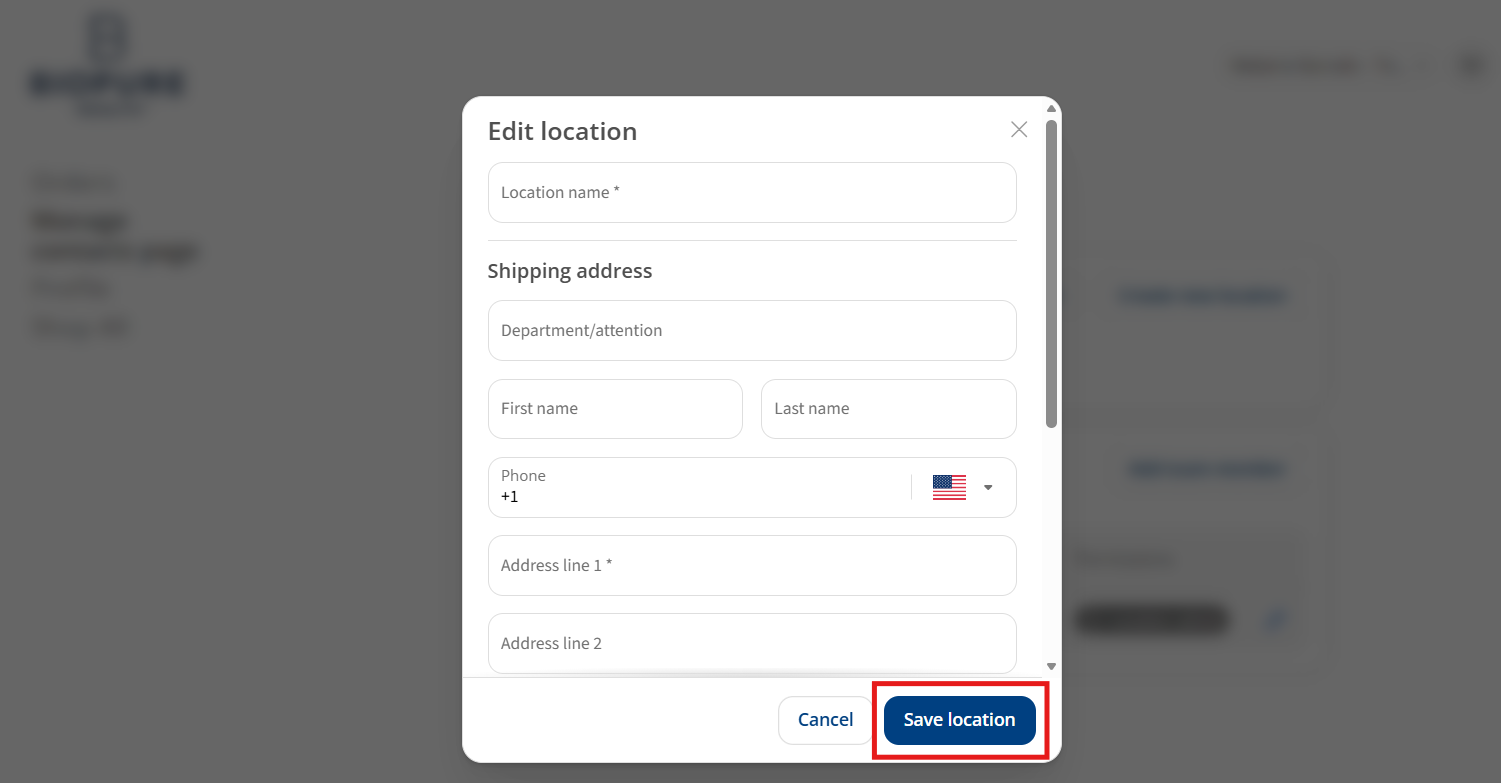
Click "Manage Contacts." Select Edit Location to change an existing location, or click Create a New Location to add one.
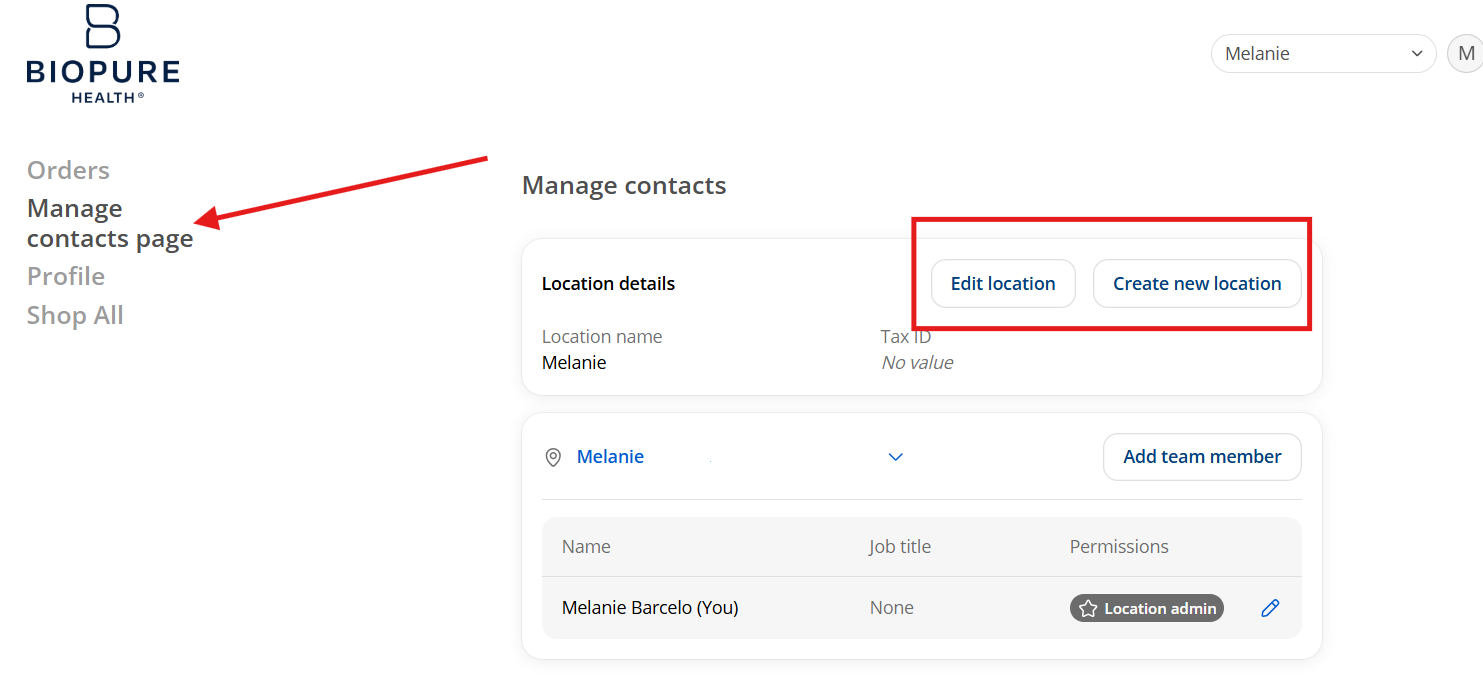
Fill out the form and click "Save Location."
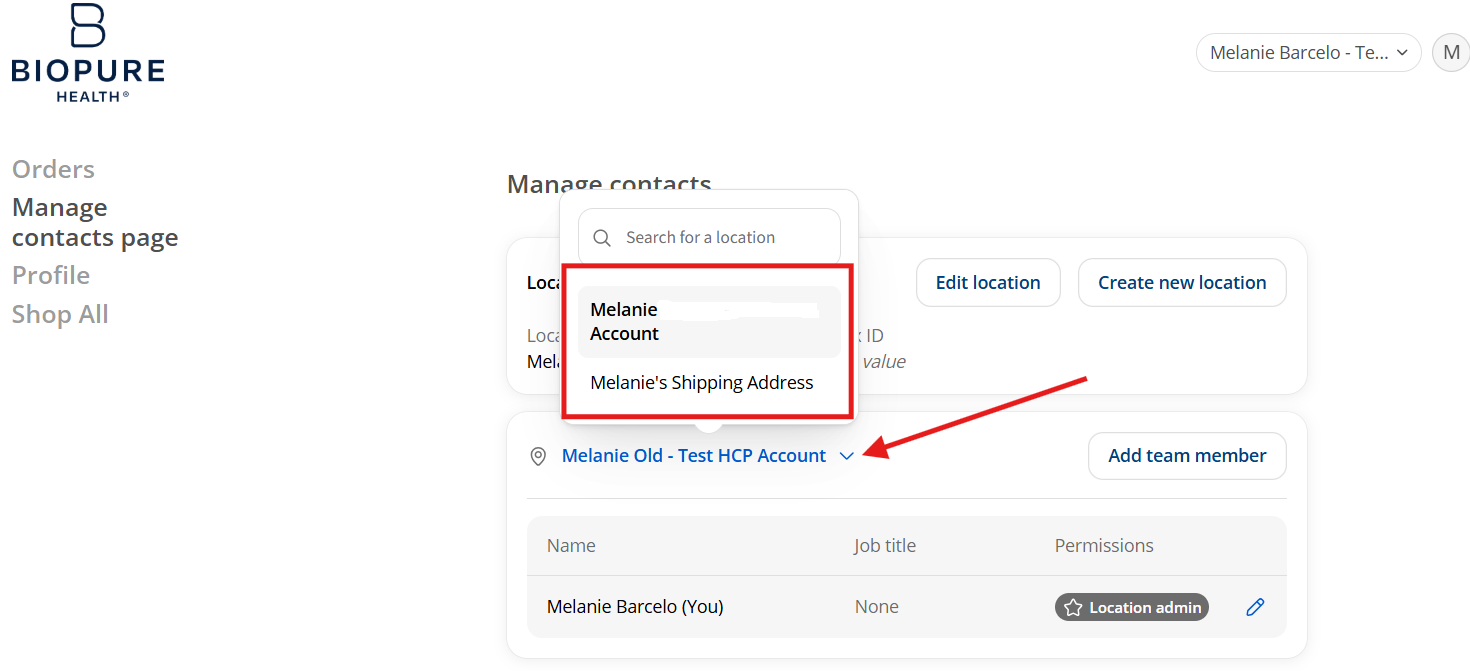
Choose your location. If you added a new location, click the drop-down arrow next to your location and select the new address. If you edited an existing location, the updated information appears automatically.
Need to change the address for just one order?
You can enter a one-time shipping address at checkout. See How do I change an address on the checkout page?
If you need to change the shipping address while on the Order or Checkout page, you have two options: select a previously saved location, or enter a one-time shipping address.
Option 1: Select a saved location
If you've already added more than one shipping address to your account, you can switch between them.
- Click the "Change Location" icon
- A list of your saved locations will appear
- Select the correct shipping address from the list
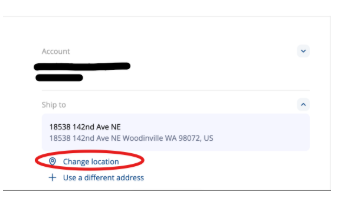
Your order will now ship to the selected address.
Option 2: Use a one-time shipping address
If you need to ship to a new address just once:
- Choose "Use a Different Address"
- Enter the shipping details for this order
Please note: one-time addresses are not saved for future use.
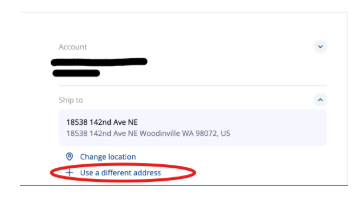
How do I save a new location permanently?
To permanently add a new shipping address to your account, exit the checkout page and update your account settings. See How do I add or edit a shipping location?
Each Healthcare Professional account is set up as a business account, registered under a business email or account holder name. You can give team members access to place orders and manage locations by adding them to your account.
How to add a team member
Log in to your Biopure Health® account. When prompted, choose your Business Location.
Click "Manage contacts page."

Click "Manage."

Click "Add team member."
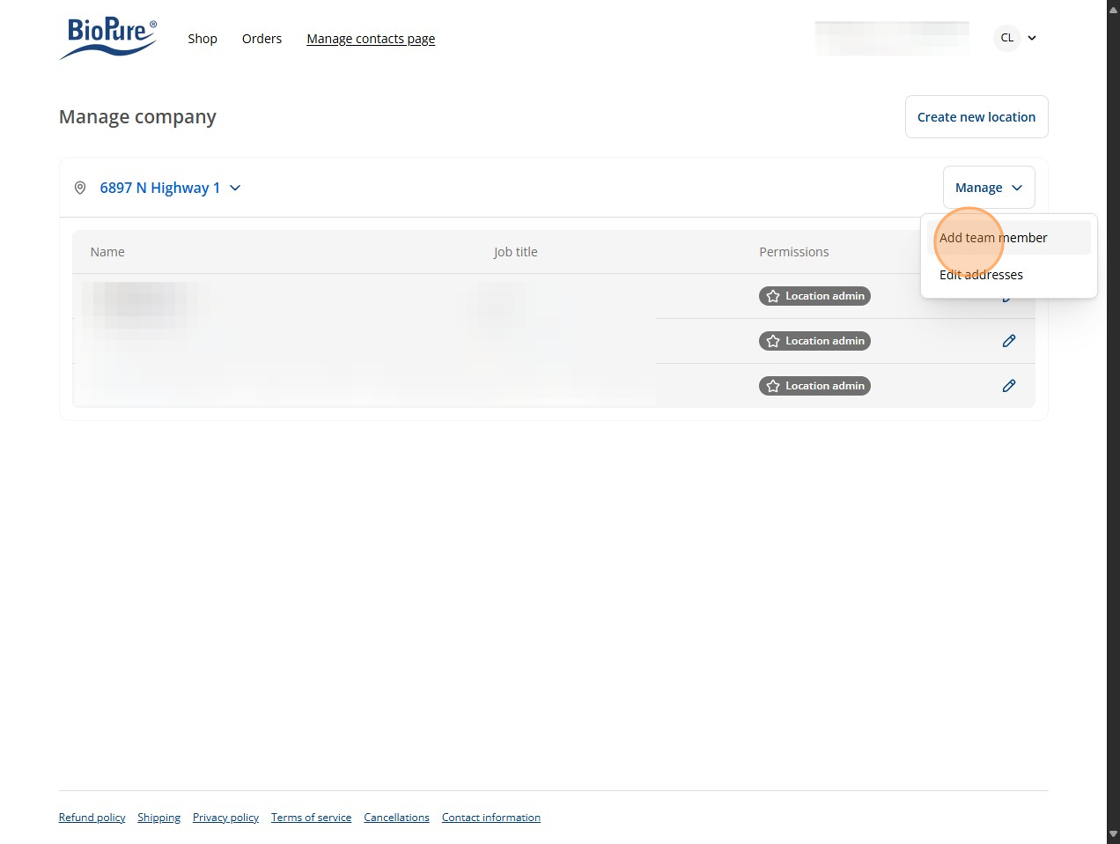
Enter the team member's details, starting with the "First name" field.

Choose a permission level: "Can place orders" or "Can manage this location and place orders." See How do I manage permissions and users? for details.
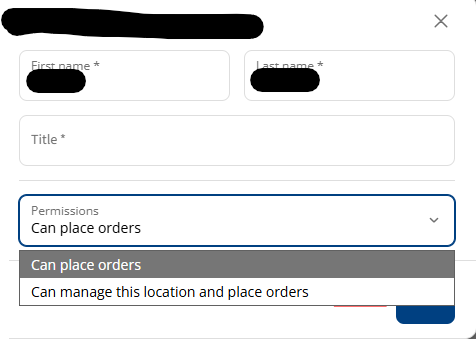
Click "Send invite."

What happens next?
The team member you added will receive an email invitation. After accepting it, they can log in with their email address and place orders under your business account.
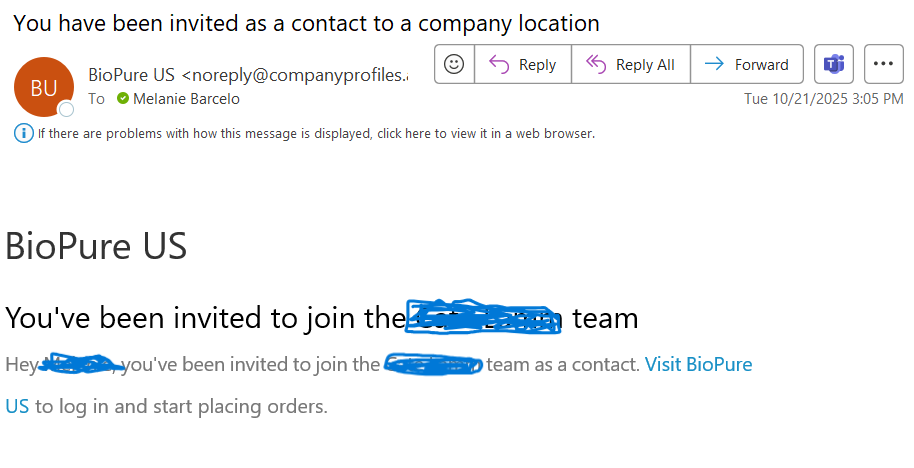
You can add or remove users and set permissions for each team member on your Healthcare Professional account.
What are the account roles?
The primary account holder is automatically assigned the Administrator role. Administrators have full access to all features in the Healthcare Professional account portal. You can also give additional team members access to help with ordering and account management.
How do I add a user?
Go to the Manage Contacts Page in your account, add the team member, choose their permission level, and send the invite. For step-by-step instructions, see How do I add a user to my account?
What permission levels can I assign?
- Can place orders: the user can view products and place orders
- Can manage this location and place orders: the user can manage shipping locations and place orders
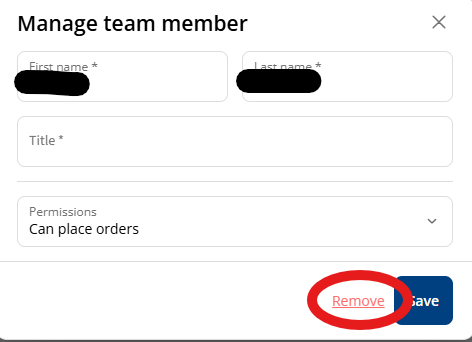
How do I edit or remove a user?
- Go to the Manage Contacts Page
- Click the Edit icon next to the user's name
- From the drop-down menu, adjust their permissions or select Remove to delete the user
Yes. Our Healthcare Professional (HCP) & Retail Price Sheet provides an up-to-date overview of current pricing for Biopure Health® products, including MAP (Minimum Advertised Price) guidelines where applicable.
Use this sheet to confirm HCP, retail, and promotional pricing before updating your website, in-office materials, or patient recommendations. We refresh this document regularly, so we recommend downloading the latest version each time you need it.
Where can I find it?
The price sheet is in our Brand Toolkit in the Resource Center.
If you have questions about pricing or can't find a product on the list, contact our support team—we're happy to help.
Shipping Information
Biopure Health® fulfills orders Monday–Friday, excluding U.S. holidays. Orders are processed in the order they are received. Orders placed on weekends or holidays will process and ship when regular business hours resume.
Can I change or cancel my order?
Once an order has been submitted, we are unable to change or cancel it.
Need help?
Email us at [email protected], or see Contact Us for our support hours.
We offer several shipping options for both domestic and international orders. Rates and estimated delivery times are below.
What does domestic (U.S.) shipping cost?
Standard shipping
Estimated delivery: 5–10 business days
- Orders under $99: $7.95
- Orders $99–$249.99: $12.95
- Orders $250 and over: Free
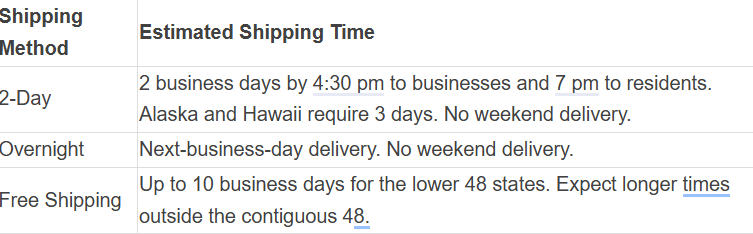
2-Day shipping
Estimated delivery: 2 business days
- $69.95–$99.95 (rate depends on order size and destination)
Overnight shipping
Estimated delivery: next business day
- $99.95
What does international shipping cost?
Standard international shipping
Delivery times vary by destination.
- Orders under $250: $99.95
- Orders $250 and over: Free
Good to know
- Shipping times are estimates and may vary due to carrier delays, holidays, or customs processing
- International orders may be subject to customs duties, taxes, or import fees, which are the responsibility of the recipient
- Orders are processed on business days only
We strive to ensure that every order is carefully packaged and error-free. If you receive an order with missing, incorrect, or damaged items, please contact our Customer Support team within 30 days of your purchase date.
How do I report a problem with my order?
Email us at [email protected] and include:
- Your order number
- A brief description of the issue
- The item(s) in question
All correction requests are subject to review and approval. See What is your return/refund policy? for details, or view our complete Shipping Policy.
I placed my order on Friday. When will it ship?
Your order will process and ship on Monday, excluding U.S. holidays.
I selected 2-Day Shipping. When will my order arrive?
Your order will arrive two business days after it ships from our warehouse. Orders process on the next business day, except for weekends and U.S. holidays. Orders placed on weekends or holidays will process and ship when regular business hours resume.
Does Biopure Health® offer free shipping?
Yes. Orders that meet these thresholds qualify for free standard shipping:
- Wholesale orders: $250 and over
- Retail U.S. domestic orders: over $99
- Retail international orders: over $150
Express shipping is not included as a free shipping option. See What does shipping cost? for all rates.
Return and Refund Policy
Can I return a product?
At Biopure Health®, we are committed to delivering premium wellness solutions with the highest standards of quality and care. Due to the sensitive nature of our products and our dedication to maintaining their potency and freshness, all sales made through Biopure Health® are final and non-returnable.
We do not accept product returns. Any items sent back to our warehouse will not be processed for refund, replacement, or store credit.
What if there's a problem with my order?
If you believe there is an issue with your order—such as missing, incorrect, or damaged items—please contact our Customer Support Team within 30 days of your purchase date so we can assist you promptly.
To request an order correction, email us at [email protected] and include:
- Your order number
- A brief description of the issue
- The item(s) in question
All correction requests are subject to review and approval by our Customer Support Team.
Do you offer refunds or store credit?
We do not offer refunds to the original form of payment. If a correction is approved, store credit will be issued for use exclusively on Biopure Health® products.
Please note:
- Sale and clearance items are final sale and not eligible for credit or replacement
- Store credit issuance is at the discretion of Biopure Health® based on the nature of the issue
You can view our full Refund Policy on our website. These terms and conditions are subject to change at any time without prior notice.
Contact Us
At Biopure Health®, we're here to support you every step of the way. Whether you have questions about our products, need help with an order, or are a practitioner interested in opening a wholesale account, we're happy to help.
What are your support hours?
Monday–Thursday: 9 AM–5 PM ET
Friday: 9 AM–1 PM ET
How can I email you?
General Customer Support & Orders
[email protected]
Product Questions & Education
[email protected]
Wholesale & Practitioner Inquiries
[email protected]
Can I text you?
Yes. Text our Customer Support Team at (425) 671-9197. This number accepts texts only, not calls.
Can I call you?
Yes. Call our Customer Support Team during business hours at (425) 462-8414.
Can I chat with you?
Yes. Click the "Need Help?" icon in the bottom-left corner of any page on our website to start a chat.